Well this is awkward…. reduce printing wastage

We’re under no illusions – nobody wants a conversation about printers. Maybe that’s why so many SMBs in the UK (52%, according to some surveys) are turning a blind eye to the cost of their printing. Because if they knew what they were spending (£10,000-a-year-plus in many cases) they most likely wouldn’t be able to keep quiet about it and would want to reduce printing wastage.

You can avoid a hidden costs discussion about printers by tackling your organisation’s print expenses head-on. We start our series on ‘how to avoid printer conversations’ with some hints and tips about how to reduce wastage in our guide to the hidden costs of printing.

How to avoid printer conversations part 1 — reduce print wastage

Companies are throwing money away on unnecessary printing, the needless use of colour and abandoned print jobs. Personnel can print without limitations and lack the training to print in a responsible way.

The reality is that you can shave 10% to 30% off your print budget by actively managing your organisation’s printing behaviour. Here’s how.

Reduce print wastage

Every office can do better when it comes to waste, and printing is no exception. The top three areas to reduce printing wastage are:

  • Unnecessary printing
  • Needless use of colour and high-quality settings
  • Forgetting to pick up print jobs

Fact: The average employee leaves 600 pieces of paper at the printer every year, and wastes an eye-watering 6,800 sheets per year.

Training gains?

Training, of course, is a great way to help us change our behaviour and tackle the problem of waste. But there are several other changes that could have a more immediate impact.

Brother’s PrintSmart Cost Control is a print management solution that lets you track what, when and how much each employee prints to reduce printing wastage. It enables you to identify the departments and individuals who may need additional training in reducing waste. To help them along, you can also apply quotas, limiting their printing output. Stop abandoning those poor print jobs.

By introducing pull printing, employees will have to actively release print jobs at the device, helping to eradicate lost and forgotten output. What’s more, by setting default options to economical settings, you can cut back on the volume of colour, single-page and high-resolution printing.

Does loyalty always pay?

In short, no.

Your old printers may have served you well, but how much is your loyalty really costing? The older the printer, for example, the more likely that it consumes significant amounts of energy even when it’s idle.

Modern printers are on average 35.6% more efficient than their predecessors.

Don’t be Dave…. download your guide to the hidden costs of printing

By working with Complete IT Systems and Brother, you can also avoid running the risk of being Dave – download your copy of the guide to the hidden costs of printing here!

Complete IT Systems and Brother

See how Complete IT Systems and Brother can help your business here.


References

https://www.newmanbs.co.uk/blog/article/how-much-paper-does-your-organisation-waste

Your business email is vulnerable – change that with a FREE scan

According to the UK’s National Cyber Security Centre, “phishing attacks are one of the most prolific and effective forms of cyber attacks as criminals exploit data breaches, current affairs, seasonal events and social media to craft seemingly personal and legitimate emails.”

The Centre also advises that “data breaches are a recurrent theme in cyber security and are often not discovered or reported until long after the initial breach”. Because of this, even individuals and businesses who may not have been affected by a breach should be vigilant to the threat of phishing attacks.

What can your business do to protect itself?

These highly personalised attacks happen in a much smaller volume than traditional phishing, and typically they do not contain malicious attachments or links. Because of this, they can be very difficult to detect using existing email security solutions.

Secure email gateways can help, but there are thousands of threats that can easily bypass standard email filters. As a result, your email inboxes almost certainly contain dormant threats that could cost you time, money, and resources with just a single distracted click.

Don’t guess how many of these dormant threats are in your inboxes – find out for sure – for free!

Barracuda Email Threat Scanner is a free service that scans all your Office 365 emails and identifies these dormant threats without any impact on your system’s performance. Use it to:

The Barracuda email security solutions bundled into Total Email Protection lead the industry in power, capabilities, and ease-of-use. Essentials Complete, Sentinel, and PhishLine provide multiple, integrated layers of security. In short, it’s the best in class at keeping your business safe from email security threats.


Run a FREE Email Threat Scan

At Complete IT Systems, we can help you run your FREE Email Threat Scan today. Discover how exposed you are to new threats, and reveal the fraudulent emails already in your mail system.


As Barracuda Partners, Complete IT Systems can offer you expert advice on the solutions and how they could be effectively deployed in your business.

To find out more please call us on 01274 396 213 or use our contact form and we’ll arrange a good time to call you back.

Make sure your emails don’t let you down

With cybercrime on the rise and more and more employees and contractors working “on the go”, it’s more important than ever to have the right email security in place for your business.

From your inbox to your employees, you need to know that every avenue a hacker could take is blocked. But with increasingly sophisticated attacks, that’s easier said than done.

Barracuda Total Email Protection ensures your organisation is secured against email-borne threats. Its multi-layered approach combines the most advanced protection available with the radical simplicity and ease of use that Barracuda’s known for.

How easy is it to deploy?

From the IT department’s perspective, you can also avoid the integration chores, uncertain support, and risk that come with building your own solution using point products from unproven startups. The full portfolio of data protection capabilities provides resiliency, and easy recovery from ransomware and accidental data loss, leaving your firm’s email security in the very best hands.


Want to give it a try?

If you would like to try the solution for yourself, please click here to request your free evaluation.

Further information

The below assets are available to make sure your business is well informed – and safe.

As Barracuda Diamond Partners, Complete IT Systems can offer you expert advice on the solutions and how they could be effectively deployed in your business.

To find out more please call us on 01274 396 213 or use our contact form and we’ll arrange a good time to call you back.

Some Christmas crackers – of the IT variety

It’s the season for it, and to celebrate the (almost) last working day before the big 2-5, we’ve joined many TV channels in producing our very own top-10 countdown. Based on some of the TV offerings we’ve seen, we could have chosen to count down anything from our top-10 favourite Christmas puddings through to our top-10 yellow socks, but as we’re IT folks we thought we’d give something else a try.

So we’ve gone for……. the somewhat less-than-punchy title of our top-10 IT, tech or internet related jokes or funny quotes. In the humble opinion of the team at Complete IT Systems, it’s 10 of the best from around the internet.

Enjoy – and please make sure you reference (or at least think of us!) if you find yourself resorting to them on Christmas day when the cracker jokes have dried up!

  1. Technology is dominated by two types of people: those who understand what they do not manage, and those who manage what they do not understand. Archibald Putt
  2. If you don’t want to be replaced by a computer, don’t act like one. — Arno Penzias.
  3. Science is supposedly the method by which we stand on the shoulders of those who came before us. In computer science, we all are standing on each others’ feet. — G. Popek.
  4. Smash forehead on keyboard to continue… – unattributed
  5. Murphy’s Law of Inconvenient Malfunction: A device will fail at the least opportune possible moment.
  6. What is a mouse potato? The online, wired generation’s answer to the couch potato.
  7. I sit looking at this damn computer screen all day long, day in and day out, week after week, and think: Man, if I could just find the ‘on’ switch… — Zachary Good.
  8. On the negative side, I’ve been getting charged for a ton of stuff I didn’t order lately. On the positive side, I did win that ‘Who’s Got the Best Password’ contest on AOL last week. — Spike Donner.
  9. At some point…we must have faith in the intelligence of the end user. – Unattributed
  10. And finally, as the great Thomas Edison once said (in a light bulb moment?…), “I have not failed. I’ve just found 10,000 ways that won’t work”.

That’s all folks – all that’s left to say is to have a great Christmas and a wonderful new year.

Thanks to the following sites for making our research easier – and there’s plenty more funnies to be found on them too.

https://whatis.techtarget.com/reference/Fast-Guide-to-IT-Humor

http://www.dangerouslogic.com/office_lexicon.html

https://whatis.techtarget.com/definition/Murphys-Law

http://www.gdargaud.net/Humor/QuotesComputer.html

https://whatis.techtarget.com/definition/Our-Favorite-Technology-Quotations

It’s the Complete IT advent calendar – there’s deals under today’s window!

With advent calendar season in full swing, we’re celebrating by showcasing our services, cyber security tips, IT cost saving advice, and other useful hints and tips. But as we do that in our blog throughout the year (by the way, let us know if you’d like us to cover any other topics and we’ll be happy to accommodate any *reasonable* requests!), we decided to do something a little different as it’s Christmas.

We’ve decided to showcase a different one of our services each day in the build-up to the big event, including some services that you may not have realised we offer and that could really be an early Christmas present for your business as you build your plans for next year. Better still it won’t affect your waistline like other more traditional forms of the advent calendar, and will be way more useful than your knitted jumper from Gran – what’s not to love!

What’s under today’s window?

Canon’s special cashback offers give you the opportunity to freshen up your print environment in spectacular style ready for the new year, with great printer cashback deals on the MAXIFY, i-SENSYS and imageRUNNER products.

Your business can now claim up to £100 cashback on the selected printers with a bonus £10 printer cashback when bought with Canon Ink or Toner (only applicable with colour printers). Full information, including how we can even help you with the claiming process, is on this page. Maybe Christmas really has come early this year!

A little about Complete IT Systems…

As always with Complete IT Systems, our goal is to work with best of breed IT solutions to give your business real competitive advantages, and above all to continue our fine tradition of offering friendly, expert advice to our clients. Now is the perfect time to see how our skilled team can help your business from our Bradford, Leicester or Glasgow offices, and see how we can help relieve unnecessary stress from your day-to-day IT and help you deliver effectively on bigger projects.

Happy 11th December, and we’ll see you tomorrow for the next window!

It’s the Complete IT advent calendar – today’s window!

As you know, it’s officially advent calendar season in the countdown to Christmas 2018. To celebrate, we thought about a few things that would be useful to do including cyber security tips, IT cost saving advice, and other useful hints and tips. But as we do that in our blog throughout the year (by the way, let us know if you’d like us to cover any other topics and we’ll be happy to accommodate any *reasonable* requests!), we decided to do something a little different as it’s Christmas.

We’ve decided to showcase a different one of our services each day in the build-up to the big event, including some services that you may not have realised we offer and that could really be an early Christmas present for your business as you build your plans for next year. Better still it won’t affect your waistline like other more traditional forms of the advent calendar, and will be way more useful than your knitted jumper from Gran – what’s not to love!

What’s under today’s window?

The right audio or visual solution can make a real difference to your business, whether it’s in efficiency terms, increased productivity or simply to impress your clients. We fully understand this and that’s why we work with you to recommend the AV equipment that meets your needs.

We can supply a wide variety of AV products and services, including conference equipment, monitors, projectors, wall screens, Plasma & HD displays, speaker systems and cabling.

Click here for some more information about what we offer.

A little about Complete IT Systems…

As always with Complete IT Systems, our goal is to work with best of breed IT solutions to give your business real competitive advantages, and above all to continue our fine tradition of offering friendly, expert advice to our clients. Now is the perfect time to see how our skilled team can help your business from our Bradford, Leicester or Glasgow offices, and see how we can help relieve unnecessary stress from your day-to-day IT and help you deliver effectively on bigger projects.

We’ll also have a few special festive giveaways and deals over the coming weeks, so keep checking back to see what’s inside the window each day!

Happy 7th December, and we’ll see you on Monday for the next window! Until then have a great weekend!


It’s the Complete IT advent calendar – window #2!

As you know, it’s officially advent calendar season in the countdown to Christmas 2018. To celebrate, we thought about a few things that would be useful to do including cyber security tips, IT cost saving advice, and other useful hints and tips. But as we do that in our blog throughout the year (by the way, let us know if you’d like us to cover any other topics and we’ll be happy to accommodate any *reasonable* requests!), we decided to do something a little different as it’s Christmas.

We’ve decided to showcase a different one of our services each day in the build-up to the big event, including some services that you may not have realised we offer and that could really be an early Christmas present for your business as you build your plans for next year. Better still it won’t affect your waistline like other more traditional forms of the advent calendar, and will be way more useful than your knitted jumper from Gran – what’s not to love!

What’s under window #2?

It’s not the most festive topic, but our best-in-class IT security services are behind today’s window. As you’ll be acutely aware, businesses now rely more and more on IT to support their activities, and this makes them increasingly vulnerable to threats from hackers, viruses and even their own staff. Having the correct information at the right time can make the difference between success and failure for your company – strong IT security has never been so crucial.

Click here to see what security services and expertise we offer our clients, and how your business could benefit too as we enter the new year.

A little about Complete IT Systems…

As always with Complete IT Systems, our goal is to work with best of breed IT solutions to give your business real competitive advantages, and above all to continue our fine tradition of offering friendly, expert advice to our clients. Now is the perfect time to see how our skilled team can help your business from our Bradford, Leicester or Glasgow offices, and see how we can help relieve unnecessary stress from your day-to-day IT and help you deliver effectively on bigger projects.

We’ll also have a few special festive giveaways and deals over the coming weeks, so keep checking back to see what’s inside the window each day!

Happy 5th December, and we’ll see you tomorrow for the next window! Until then!

It’s the Complete IT advent calendar!

As you know, it’s officially advent calendar season in the countdown to Christmas 2018. To celebrate, we thought about a few things that would be useful to do including cyber security tips, IT cost saving advice, and other useful hints and tips. But as we do that in our blog throughout the year (by the way, let us know if you’d like us to cover any other topics and we’ll be happy to accommodate any *reasonable* requests!), we decided to do something a little different as it’s Christmas.

So, drum roll……

….we’ve decided to showcase a different one of our services each day in the build-up to the big event, including some services that you may not have realised we offer and that could really be an early Christmas present for your business as you build your plans for next year. Better still it won’t affect your waistline like other more traditional forms of the advent calendar, and will be way more useful than your knitted jumper from Gran – what’s not to love!

As always with Complete IT Systems, our goal is to work with best of breed IT solutions to give your business real competitive advantages, and above all to continue our fine tradition of offering friendly, expert advice to our clients. Now is the perfect time to see how our skilled team can help your business from our Bradford, Leicester or Glasgow offices, and see how we can help relieve unnecessary stress from your day-to-day IT and help you deliver effectively on bigger projects.

We’ll also have a few special festive giveaways and deals over the coming weeks, so keep checking back to see what’s inside the window each day!

So we know you’re waiting with bated breath! What’s under the first window?

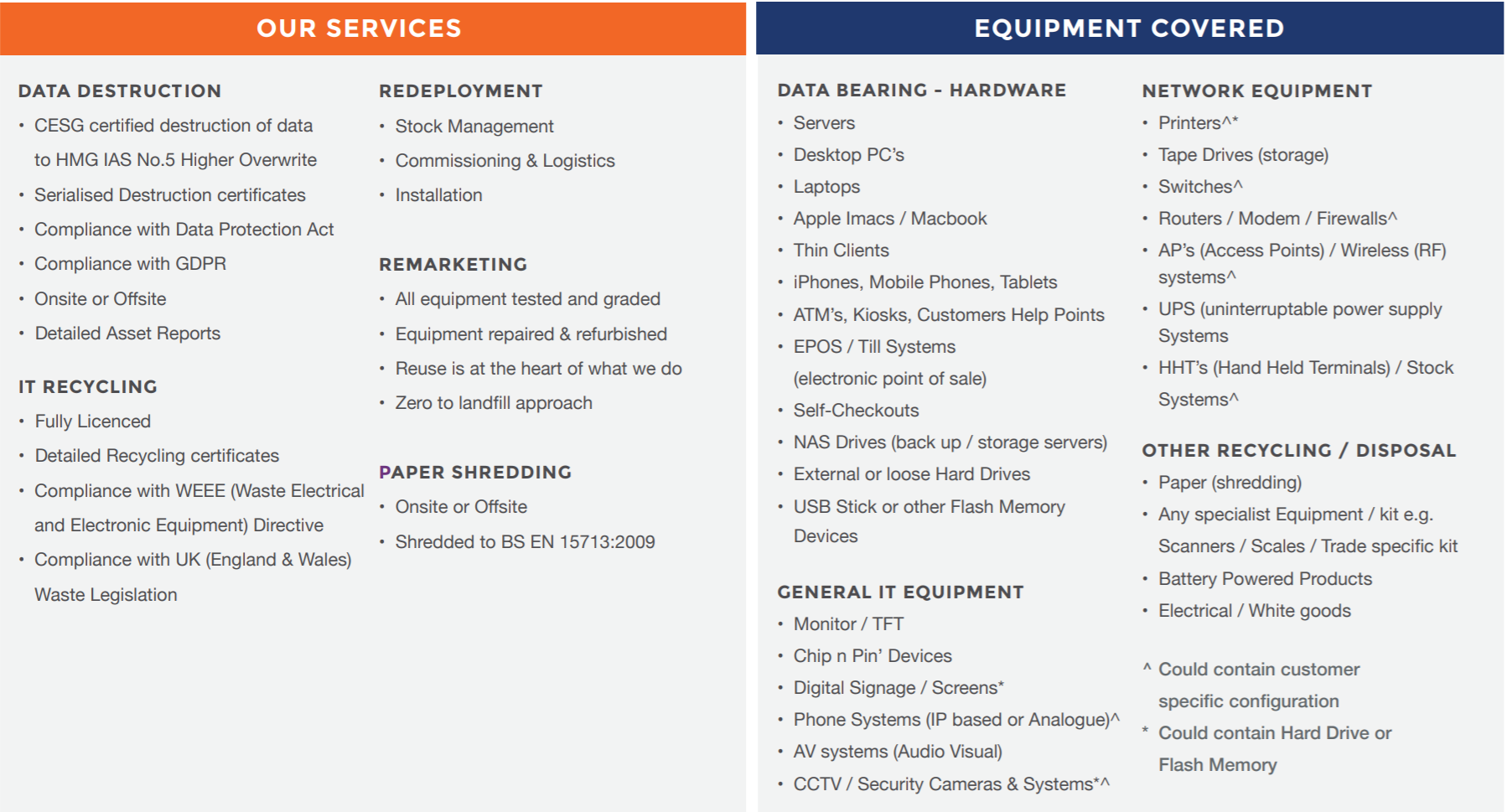
Under today’s window are our new IT recycling and data destruction services, as we thought it would be a great place to start as you revisit your green policies for 2019. 

In the modern era, it’s not enough for a business to wash its hands of IT hardware when it reaches the end of its valuable life or as you begin your journey into the cloud. Not only is such a practice bad for the environment, but irresponsible disposal of IT assets can also carry a data security risk as well as compliance ramifications.

We have developed new this service in response to our customers’ requests to help them given the increased importance of data protection legislation and GDPR compliance. As you would expect, we use state of the art tools to ensure all your company data is erased, whilst at the same time upholding all our responsibilities under the Waste Electrical and Electronic Equipment (WEEE) directive and UK (England & Wales) waste legislation to ensure equipment is where possible re-used and/or recycled.

An outline of the service is provided below, and you can call us on 01274 396 213 at any time for an informal chat to find out more.

Happy 4th December, and we’ll see you tomorrow for the next window! Until then!

Why are mobile devices like a needle in a haystack for IT?

When your business depends on response speed and access to data and email, ‘on the go’ availability is a must. However, more access brings more mobile data security threats. That is why it is rational to assess risks and have a well-thought-out protection strategy before adopting mobile device usage across your business.

As part of our series of blogs highlighting the pitfalls of cyber security for business, this week we’re looking at why mobile devices with access to business data can prove to be a needle in a haystack for IT to keep track of.

Mobile devices – a needle in a haystack for IT

An employee’s mobile device is an interesting target to a broad array of cybercriminals. Some are looking for corporate intellectual property (and according to Kaspersky’s “IT Security Risks Survey 2018,” employees in 1 in 5 enterprises access corporate intellectual property using their personal mobile devices and tablets). Others think that your contact list is good loot — it can be used for spear-phishing attacks on your colleagues.

While those are rather exotic threats, don’t forget about more widely distributed malware that doesn’t target a specific business. Last year, our systems registered 42 million attempted attacks on mobile devices. They included a variety of Trojans that tried to hijack social media and bank accounts, ransomware, and more. They may not sound as scary as targeted attacks, but they can cause plenty of harm, especially if the accounts in question are corporate ones, and the situation is especially common in small and medium businesses.

Mobile specifics

The main problem with mobile devices is that they do not stay inside a company’s security perimeter, which makes pinpointing the threats akin to searching for the proverbial needle in a haystack for IT. They can be exposed to unsecured public Wi-Fi or just be lost or stolen. When employees use the same device for both work and personal activities, more problems pop up. An employee might accidentally download a compromised application preloaded with a spying module or ransomware, for example. They might try to root or jailbreak their device and expose it to even more threats.

Some of the problems with mobile data security — unfortunately, not all of them — can be solved with mobile device management and enterprise mobility management solutions. To resist sophisticated malware, companies need an additional level of protection.

How to prevent business mobile security breaches

Kaspersky’s ‘Security for Mobile’ solution was recently updated to include machine-learning-assisted technologies with cloud-based threat intelligence mechanisms to bring threat prevention, detection, and remediation to mobile platforms and thus keep your business information safe.

For example, Kaspersky Security for Mobile can detect if an employee’s smartphone or tablet is jailbroken or rooted (bad enough if the employee did it, but worse if done without their knowledge). Our solution also provides application control, Web traffic control, antiphishing, and antispam subsystems to corporate devices.

Kaspersky Security for Mobile integrates with Microsoft Exchange ActiveSync, iOS MDM, and Samsung KNOX platforms; and Kaspersky Security for Android (a part of this solution) is also compatible with VMware AirWatch and MobileIron. That compatibility allows your IT staff to configure and control security management for most widely used mobile devices.

Want to find out more?

As Kaspersky Platinum Partners, Complete IT Systems can offer you expert advice on the solutions and how they could be effectively deployed in your business.

To find out more please call us on 01274 396 213 or use our contact form and we’ll arrange a good time to call you back.

A data breach won’t happen to our business, we’re all tech savvy…

As part of our series of blogs highlighting the pitfalls of file sharing with USBs, this week we’re looking at some common mistakes that are very easy to make in a busy office environment. And it’s also a reminder that, rightly or wrongly, having a policy in place does not mean it’s being followed.

A day in the life of a small business

To do this, we’ll step into a day in the life of the Magenta Elk advertising agency – from its beginnings as a family design studio, ME has grown into a company with almost 100 employees. Now it has a whole department of designers, a creative director able to hit the spot with even the most delusional client, a Web development department, and even its own small printing house (also a former small business, acquired three years ago). Among its clients are several major international companies that trust the agency to handle their advertising campaigns.

How about IT?

But the owners never found the resources for a halfway-decent IT department. Bill manages all equipment; he repaired computers as an on-call handyman before being hired a few years ago. He never managed to persuade the owners to take on at least one more member of staff to help out.

As a result…

Bill doesn’t like morning calls. It’s not that he’s lazy; he just thinks that work should begin once one’s emotional balance has been restored after the mayhem of the morning commute — and certainly not before the second cup of coffee. But the phone’s been ringing non-stop.

“Give me a break! Don’t people know it’s rude to hang up after three rings! No respect! What if I’m busy with something important?” grumbles Bill, trying to dig out his phone from under a pile on his desk as it rings again.

“Bill, my flash drive isn’t loading,” the layout designer whines over the phone.

“That’s because I disabled all the ports on your machine ages ago! You know all files have to be loaded through a secure computer — talk to Albert. If I had my way, I’d cut you off from the Internet!” he responds, adding silently to himself, “and I’d rip your arms off as well.”

“I know, I know! But it’s not just me — it won’t load on anyone’s computer! Please help, it’s a really important task. We have to change the layout quick or they’ll kill me. Albert won’t be back till after lunch.”

“Dwight, we agreed that all tasks go through Albert, all documents go through his computer. It’s the only one in the department with antivirus. Anyway, who suddenly gave you files on a flash drive?”

“Christine did. She asked me to make some urgent corrections to the layout of the leaflet. It needs to be printed ASAP. She’ll kill me if it’s not done pronto, she doesn’t care if Al’s not around. You know what she’s like.”

“Your flash drives will be the death of me. Fine, I’ll be right there.”

Bill hangs up and looks thoughtfully at the ceiling. Yeah, their boss is a dragon, all right — and she couldn’t care less about conventions like the procedure for transferring files from external sources. The sysadmin stands up, stretches, puts his laptop under his arm, and heads toward the design area.

“Give me your flash drive!” growls Bill, opening his laptop as he approaches. “What can’t you read here? Everything’s working on my machine. Drivers are installing…scan, you bet…open…here’s the project folder.”

At this point, the antivirus displays a red window: “Malicious object Trojan.downloader.thirdeye.n was detected.” Bill gapes at the screen.

“Dwight, what the hell is this?! Did you try to open this anywhere else?” Bill jabs a finger at the file Layout_corrections.docx.exe.

“Well, how else would I know what changes to make? I tried, but it wouldn’t open at all. I clicked and nothing happened.”

“Can’t you see it’s not even a document?! The extension is EXE!”

“I can’t see any extensions! I can see the icon and the name. Why are you shouting at me? All I did was try to open Christine’s file!”

“Makes sense, I guess. The extensions of known files aren’t shown,” muses Bill. “All right, let’s stay calm: Which machines did you try to read it on?”

“Well, on Anna Miller’s, in accounting. On the photographer’s laptop. And there was Lena from logistics. And Tom from Web dev. And Kate…what’s wrong, is it a virus? It’s not my fault! Maybe the photographer had an infection!”

“This isn’t just any virus — it’s a Trojan tailor-made for you! It doesn’t just infect random machines; someone put it on this flash drive specifically!” Bill logs in to the Web interface of the router to isolate the computers mentioned. “By the way, where did you get Christine’s password? She left yesterday for a business trip.”

“It’s on a piece of paper under her keyboard — everyone knows that…” mumbles the layout designer, still on the defensive. “I didn’t take it home or anything, I only found it yesterday!”

“What do you mean, ‘found’?” says a startled Bill.

“Well, I mean she left it for me at reception with a note saying to fix the layout ASAP.”

“Are you out of your mind? Christine was here almost all day yesterday. Why the hell would she need to leave a flash drive with instructions on a sticky note? Does she leave you notes a lot? You know she prefers to talk face-to-face. And she’d just upload the files to the server! Oh crap, the server!” Bill starts tapping the keyboard again. “Anyone can leave anything at reception. What time did it happen, exactly?”

“Well, I don’t know. It was evening and I was about to leave, then Yvonne said that someone had left me an envelope with a flash drive. She was on her way out for a bite, but she didn’t see who it was. I came back, tried it on Anna’s laptop and on Christine’s, then — well, you know the rest.”

“Dwight, you understand that someone — ” the tirade is interrupted by a mobile call. It’s the CEO. “I’ve got a bad feeling about this….”

“What’s up? Why aren’t you at your desk?” inquires the short-tempered CEO.

“Sorry, the designers have a problem. Someone left a USB flash drive — ”

“Forget the designers,” interrupts the CEO. “I just got a call from Österberg & Jones. Their website has been seeding viruses since last night. We’re the only other people who had access to the site — for updating banners. I need proof it wasn’t us. Assuming it wasn’t us.”

“Umm. Who was it who had access?” asks Bill, growing cold.

“Don’t know, exactly. A couple of Web dev guys; they did the site. Maybe Dwight. Christine for sure — it’s her client, and you know she loves having control over everything.”

“Mmmm…here’s the thing…” Viktor’s voice suddenly drops. “Actually, I think it was us.”

“Well, we’re screwed. They’re threatening lawsuits. If it’s us, then we have a lot of explaining to do. I need a detailed analysis by end of day. If you need outside experts for the investigation, let me know right now. I need a full, honest report in hand when I go crawling to Österberg & Jones. Now give me a quick rundown. What the hell happened?”

“Looks like someone deliberately hit us with an infected flash drive. Österberg & Jones was probably the real target. You know how security is. I do what I can, but we’re a little short on equipment, people, materials…. Even the antivirus isn’t — ”

“OK, OK, I get it. That’s your polite way of saying I’m an idiot. You’ll get your staff, and antivirus for everyone. If we survive this. Which I very much doubt.”

So what can be learned from Magenta Elk’s unfortunate tale?

  1. The company’s procedure for working with files from external sources is perfectly good and proper. But it is not followed, because some employees believe that a task is more important than security. In reality, security should have a higher priority than even direct orders from management.
  2. Too many people can access partner resources, a problem made worse by the fact that no one knows exactly who has access. Ideally, this information should be known by one employee, maximum two. Moreover, access credentials should be required for every login. Saving them in the browser is an extremely bad idea, as is accessing the site from an unprotected computer.
  3. Passwords written on paper and stuck under the keyboard may sound ludicrous, but it’s actually quite common at many companies. This is totally unacceptable — even if no one ever comes to your office, sometimes team members can cause just as much damage.
  4. A reliable security solution must be installed on all machines, without exception.

Want to find out more?

As Kaspersky Platinum Partners, Complete IT Systems can offer you expert advice on the solutions and how they could be effectively deployed in your business.

To find out more please call us on 01274 396 213 or use our contact form and we’ll arrange a good time to call you back.