Top tips for securing collaboration tools

As collaboration tools become more and more fundamental to team collaboration, and by extension, company success, alongside their benefits, cloud solutions for file storage and document or project management can cause many problems for IT departments.

Smaller businesses rarely invest in high-cost collaboration tools, opting instead for cheaper — or, better still, free — utilities. For better or worse, they have plenty of choices. However, failure to consider the security implications of using such tools can end up costing SMBs far more than they budgeted for.

In this article, we share some tips and best practices for making sure that your users can work as productively – and as securely – as possible.

Document collaboration tools

Many services allow small teams to edit documents simultaneously. They’re not just text tools, though; using them, team members can jointly develop graphical interfaces, diagrams, source code, and much more as well. It is handy, after all. However, before using such a service, it is worth understanding exactly how it works: how it stores your information, who has access to it, what security settings are available. Leaving work files publicly accessible is always a bad idea. Even if you are not concerned about information leakage, an intruder could gain access and make their own changes to your project documentation.

Google Docs or Microsoft Teams, OneDrive or Sharepoint provide the most vivid examples. People often share documents through those platforms, using a direct link without any restrictions. That means search engines can index them, and therefore pretty much anyone can see them. Complete strangers have found all sorts of confidential information in those docs: employees’ personal data, lists of customers including contact details, and even payroll records.

What to do: Use only services in which you can hide documents from prying eyes, or that at least give a clear explanation of how documents are stored. Do not forget to configure access rights — the ability to do so is a vital consideration. So, if you use Google Docs for work purposes, restrict access, granting it only to people you share documents with, and do not forget to revoke it if they no longer need it.

Cloud file storage

Another type of service that you should treat with caution is cloud file storage. Need to transfer a large amount of information? No problem — just upload it to the cloud and send the recipient a link. That neatly avoids any e-mail size limits. But many file-sharing services have no protection at all; and, again, files can pop up in the search results of random strangers.

Even if a service has protection, you need to turn security settings up to the max. People often sign up, upload data to the cloud, and forget about it. But passwords can leak. One hackers even stole passwords from Dropbox, not to mention smaller services.

What to do: Choose a reliable file-sharing service that supports two-factor authentication. Once you put data in the cloud, do not forget about it, and if you’re no longer using a file for work, delete it. Settle on one service for sharing files; using more than one invites confusion.

Project-management environments

Overall, these platforms allow workflow participants to communicate, share files, and systematize projects. If you use one to discuss business strategies or transfer files, it is important to know not only who can see them today, but also who might be able to later. Some cloud platforms make everything visible to everyone by default. Users can hide items, but odds are they won’t remember to 100% of the time; the default usually stands. What’s more, if someone gets access to a project, it is likely they will gain access to the entire project history, which is not always desirable.

Companies often grant access to such environments to contractors or freelancers, who may be working for you today and for a competitor tomorrow. Not to mention dismissed employees, who might have time to download an archive before you revoke their permissions.

What to do: Regulate project access rights, restricting those rights to work-related files only, for all parties. Use separate communication environments for employees and external people (contractors, customers). And do not forget to revoke access for former employees and freelancers promptly.

Additional tips

Remember that all services may have vulnerabilities (which might be undiscovered when you start working with them). In addition, many services have client apps with their own problems. Therefore, we recommend that you stick to the following principles:

  • Before you start working with a service, carefully study its settings and data processing rules, as well as read how people have reviewed it in the context of security.
  • Your dedicated IT expert or team, if you have one, must clearly understand what services you use, how they are configured, and who is handling their administration.
  • If you have no dedicated specialist, appoint a responsible party for each service to ensure that the client app is updated promptly any time a vulnerability is found, that passwords are changed in the event of a leak, and that access rights are issued and revoked as and when required.
  • Any service used to share a link or file can potentially be a malware distribution channel. Therefore, every device on which these tools are used needs a reliable security solution.

What’s the solution?

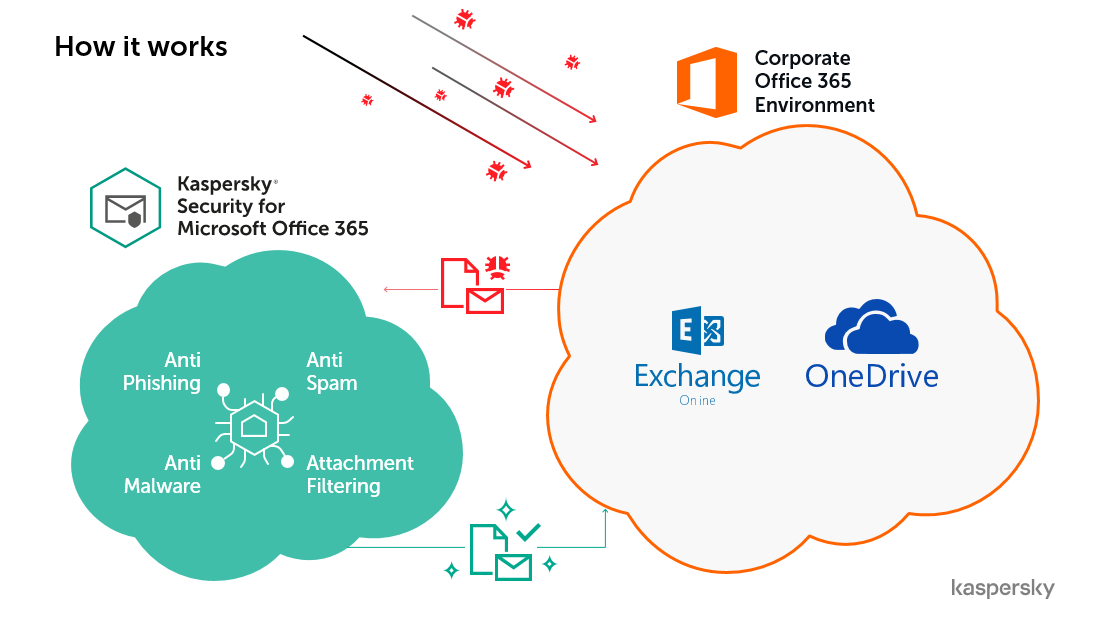
With Kaspersky Security for Microsoft Office 365, your company can protect Exchange Online, OneDrive files, SharePoint files, and Teams files against malware, phishing, spam, and other threats.

Click here to view the full datasheet, or watch the short video below.

Want to find out more?

As Kaspersky Gold Partners, Complete IT Systems can offer you expert advice on the solutions and how they could be effectively deployed in your business.

To find out more please call us on 01274 396 213 or use our contact form and we’ll arrange a good time to call you back.

How to secure data on Microsoft Office 365

Although it may be tempting to think that with data in the cloud your business isn’t susceptible to data loss, it’s still vital to add an additional security layer to protect email from spam, phishing, ransomware and other advanced cyber threats. In fact, nowadays malware is usually sent via email and hosted on cloud storage platforms.

Protecting even a cloud-oriented business from known and unknown threats is therefore critical in order to instantly stop the spread of malicious software, phishing, ransomware, spam and business email compromise (BEC) – and best of all requires no high-tech skills.

What’s the solution?

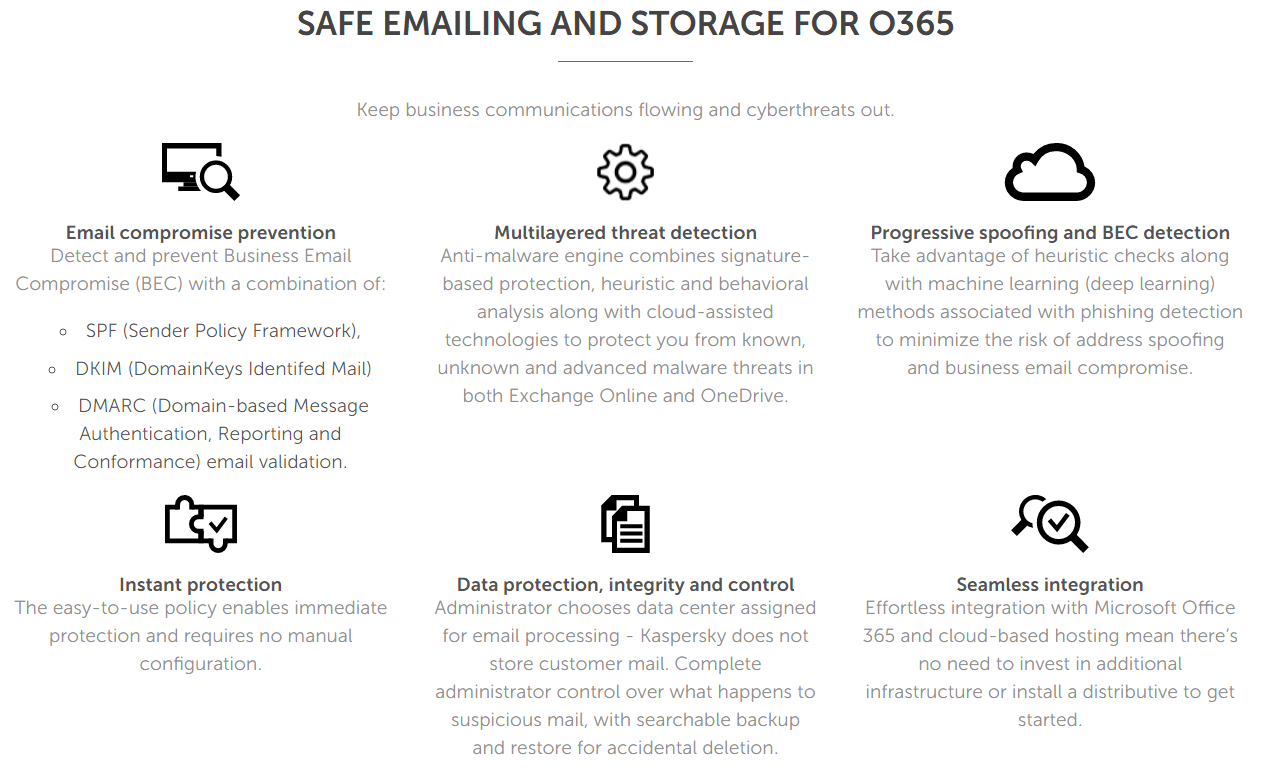
With Kaspersky Security for Microsoft Office 365, your company can protect Exchange Online, OneDrive files, SharePoint files, and Teams files against malware, phishing, spam, and other threats.


Make use of the most sophisticated technologies for your security and at the same time enjoy a quick start thanks to predefined policies and auto configuration.

Get a 6 month FREE trial!

To support remote working in this challenging time, we’re offering 6 months’ FREE protection with the very latest version of Kaspersky Security for Microsoft Office 365. This extends protection for SharePoint Online and Microsoft Teams, securing all collaboration and messaging channels within Microsoft Office 365.

Kaspersky Security for Microsoft Office 365 uses advanced heuristics, machine learning and other next-generation technologies to protect your communication and collaboration processes from ransomware, malicious attachments, spam, phishing (including Business Email Compromise) and unknown threats.

Sign up NOW for a FREE 6-month license and take protecting remote workers off your to-do list.

Click here to view the full datasheet, or watch the short video below.

Want to find out more?

As Kaspersky Gold Partners, Complete IT Systems can offer you expert advice on the solutions and how they could be effectively deployed in your business.

To find out more please call us on 01274 396 213 or use our contact form and we’ll arrange a good time to call you back.


90% of malware is delivered via email. Is your business email secure?

Malware and email messages are, unfortunately, the same as bread to butter or hands to gloves. The two go hand in hand. In fact, the connection is so acute that it’s been found that over 90% of all known malware is delivered into companies via email.

And there’s even worse news for IT managers and systems administrators. Here’s some of the main points from the Cofense State of Phishing Defence report:

  • The average user / employee doesn’t go two full days between receiving phishing messages
  • More than 50% of phishing messages have the word “invoice” in the subject line
  • 21% of malicious emails carry harmful attachments or phishing-related malware

Given that this data was gathered over 135 million simulations, 800,000 emails and 50,000 actual phishing campaigns targeting companies in 23 industries, the threat is obviously a real one.

Protect your business email with a 6 month FREE Kaspersky trial!

To support remote working in this challenging time, we’re offering 6 months’ FREE protection with the very latest version of Kaspersky Security for Microsoft Office 365. This extends protection for SharePoint Online and Microsoft Teams, securing all collaboration and messaging channels within Microsoft Office 365.

Kaspersky Security for Microsoft Office 365 uses advanced heuristics, machine learning and other next-generation technologies to protect your communication and collaboration processes from ransomware, malicious attachments, spam, phishing (including Business Email Compromise) and unknown threats.

Sign up NOW for a FREE 6-month license and take protecting remote workers off your to-do list.

Why Kaspersky?

  • Prevent threats and keep your business running
  • Endpoint protection from the most tested, most awarded security vendor
  • Protect Windows desktops and file servers, Mac OS workstations, iOS and Android smartphones and tablets
  • Secure Microsoft Office 365 communication and collaboration

Want to find out more?

As Kaspersky Gold Partners, Complete IT Systems can offer you expert advice on the solutions and how they could be effectively deployed in your business.

To find out more please call us on 01274 396 213 or use our contact form and we’ll arrange a good time to call you back.
 

References:

https://www.darkreading.com/attacks-breaches/most-malware-arrives-via-email/d/d-id/1333023

https://cofense.com/state-of-phishing-defense-2018/

Reopening the workplace after COVID-19: A checklist for businesses

As the UK and other countries and cities start to ease lockdown restrictions, this handy checklist for reopening business workplaces can help you jumpstart safe and efficient returns to work, and kick-starting of business.

You and your users have been quarantined in your homes for the past few days weeks months, and now
authorities are looking to lift restrictions and open up. You may be thinking, “We’ll be back soon, and I can get out of this house!” The problem is, if you just pick up and go, and don’t prepare for having people back in the workplace, you may run into issues that could have been easily avoided. So now is the time to prepare.

This checklist is not meant to be an exhaustive list, but it can help provide guidance as you look to reopen. It’s
organised into four sections:

  • People
  • Workplace
  • Technology
  • Your Customers

Every company’s situation is of course unique, but evaluating your plan with these components in mind can help you get organised and anticipate obstacles that may stand in the way.

Extra security layers for collaboration tools

As you can read in the Technology section of the checklist, many users have been using Microsoft Teams for collaborating with colleagues during the lockdown period. Yet one in three users experience data loss in cloud applications like Microsoft Office 365 and Google G Suite.

With more and more businesses now using the Microsoft Office 365 suite of tools, it’s more and more vital to ensure that your data is adequately backed up to avoid accidental loss, or the risk of being held to ransom for your own data.

We’ve pulled together a list of 4 reasons to add an additional layer such as Datto SaaS protection to your organisation’s data, and this video outlines Datto’s SaaS protection services in a little more detail.

Find out more

You can read more about Datto SaaS data protection in this article.

As Datto Partners, Complete IT Systems can offer you expert advice on the solutions and how they could be effectively deployed in your business.

To find out more please call us on 01274 396 213 or use our contact form and we’ll arrange a good time to call you back.
Datto

Help during the COVID-19 crisis

The expert team at Complete IT Systems are publishing a series of guidance and tips to help you and your business through this situation. This covers all aspects of quickly providing safe, comfortable and efficient home offices for your users, including data security, collaboration tools, laptops, desktops, print and consumables, support for critical IT tasks, and more. Click here for our central COVID-19 resource hub.


FREE E-Signing throughout 2020!

In these trying times when the face-to-face signing of documents and contracts is no longer possible in many cases.

Nitro Sign is the smarter eSignature solution that keeps every business moving forward with 100% end-to-end digital document workflows from anywhere. Get documents signed smarter, faster and more securely – without the need for paper and pen.

FREE trial – for the whole year!

You can prepare your business now for the future of remote work with Nitro Sign Team FREE for the remainder of 2020! Get up and running quickly during these challenging times!

https://www.youtube.com/watch?v=7jFpFFMtIeU

Here’s just some of the ways Nitro Sign can help your business!


What customers say

“We’ve already seen a positive impact from implementing Nitro Sign to facilitate everyday signature requests
that can now be completed much faster — and without involving paper.”

Adam Grainger
Chief Information Officer, Baker Tilly

Want to find out more?

Complete IT Systems can offer you expert advice on various homeworking and remote working solutions and how they could be effectively deployed in your business.

To find out more please call us on 01274 396 213 or use our contact form and we’ll arrange a good time to call you back.

Help during the COVID-19 crisis

The expert team at Complete IT Systems are publishing a series of guidance and tips to help you and your business through this situation. This covers all aspects of quickly providing safe, comfortable and efficient home offices for your users, including data security, collaboration tools, laptops, desktops, print and consumables, support for critical IT tasks, and more. Click here for our central COVID-19 resource hub.


Back to work PPE packages

All businesses are now having to consider health and safety more than ever in order to create a safe and hygienic working environment for staff returning to work. Social distancing rules, sharing of equipment, positioning and cleanliness of desks and workstations, and educating staff about what they need to be doing are clear areas of concern.

To help with this, Complete IT Systems are offering 3 specially designed packages of workplace PPE materials:

Want to find out more?

Complete IT Systems can offer you expert advice on various PPE solutions and how they could be effectively deployed in your business.

To find out more please call us on 01274 396 213 or use our contact form and we’ll arrange a good time to call you back.

Help during the COVID-19 crisis

The expert team at Complete IT Systems are publishing a series of guidance and tips to help you and your business through this situation. This covers all aspects of quickly providing safe, comfortable and efficient home offices for your users, including data security, collaboration tools, laptops, desktops, print and consumables, support for critical IT tasks, and more. Click here for our central COVID-19 resource hub.


Get back to work safely with thermal imaging smartphones

The award winning Cat S61 smartphone is a fast, smart and reliable solution to detect individuals with an elevated skin temperature.

Thermal imaging technology allows users to quickly and efficiently screen people from a safe distance as they enter anything from an office to a shop.

Those identified can then be tested medically and provided with the necessary assistance.

Want to find out more?

Complete IT Systems can offer you expert advice on various PPE solutions and how they could be effectively deployed in your business.

To find out more please call us on 01274 396 213 or use our contact form and we’ll arrange a good time to call you back.

Help during the COVID-19 crisis

The expert team at Complete IT Systems are publishing a series of guidance and tips to help you and your business through this situation. This covers all aspects of quickly providing safe, comfortable and efficient home offices for your users, including data security, collaboration tools, laptops, desktops, print and consumables, support for critical IT tasks, and more. Click here for our central COVID-19 resource hub.


Glass screen dividers: Prepare your workplace and protect your staff

In response to the challenges faced by businesses looking to provide measures to protect their staff from the spread of airborne viruses, protective screens are a great way of securing your staff but getting them back to work in a productive manner.

The protective glass screens are an ideal solution to enable employees to social distance in the office, and other workplace environments.The glass is high enough to give protection but not too high to make employees feel cut off and isolated. The screens also reduce unwanted office noise as the material has sound-reducing properties. Glass also has the benefit of being easier to clean and resistant to scratches ensuring longevity. The screens can be manufactured to any size and can be made using toughened or laminated glass. The screens can include privacy bands and incorporate company branding such as logos. Fastenings for the screens are also included.

*Screens are made to order and can be bespoke to your exact requirements*.

Want to find out more?

Complete IT Systems can offer you expert advice on various PPE solutions and how they could be effectively deployed in your business.

To find out more please call us on 01274 396 213 or use our contact form and we’ll arrange a good time to call you back.

Help during the COVID-19 crisis

The expert team at Complete IT Systems are publishing a series of guidance and tips to help you and your business through this situation. This covers all aspects of quickly providing safe, comfortable and efficient home offices for your users, including data security, collaboration tools, laptops, desktops, print and consumables, support for critical IT tasks, and more. Click here for our central COVID-19 resource hub.


6 months’ FREE Kaspersky protection for Office 365

Working remotely is now mandatory for many users – including some whose companies have never even considered it before. IT leaders worldwide are having to react quickly to support remote workers, and ensure their cybersecurity. Many are turning to collaboration solutions based on the Microsoft Office 365 suite, and if this includes you, we’re here to help you.

6 months FREE Kaspersky protection!

To support remote working in this challenging time, we’re offering 6 months’ FREE protection with the very latest version of Kaspersky Security for Microsoft Office 365. This extends protection for SharePoint Online and Microsoft Teams, securing all collaboration and messaging channels within Microsoft Office 365.

Kaspersky Security for Microsoft Office 365 uses advanced heuristics, machine learning and other next-generation technologies to protect your communication and collaboration processes from ransomware, malicious attachments, spam, phishing (including Business Email Compromise) and unknown threats.

Sign up NOW for a FREE 6-month license and take protecting remote workers off your to-do list.

Why Kaspersky?

  • Prevent threats and keep your business running
  • Endpoint protection from the most tested, most awarded security vendor
  • Protect Windows desktops and file servers, Mac OS workstations, iOS and Android smartphones and tablets
  • Secure Microsoft Office 365 communication and collaboration

Want to find out more?

As Kaspersky Gold Partners, Complete IT Systems can offer you expert advice on the solutions and how they could be effectively deployed in your business.

To find out more please call us on 01274 396 213 or use our contact form and we’ll arrange a good time to call you back.

 

Cost-effective flexible communication connections on O2

In these unprecedented times, it is important that businesses are still able to communicate effectively and flexibly. That’s why Complete IT Systems are offering our customer base Flexible Energized SIM Connections on O2 – a communications lifeline with no contract.

The E241S enables you to access 4G Internet, Wi-Fi and GPS, to download apps, plus lots of other services. The KaiOS operating system brings essential smartphone functions to classic mobile phones.

Energizer E241S 4G at just £39*.

Features

1900 mAh battery – 28 hours Talk Time – 6 days Standby Time.
4G LTE – Dual Sim – 4GC ROM – 512MB RAM – MicroSD up to 128GB

Energizer E241S 4G at just £39*

Additionally, a 60 day SIM on O2:

ALL with Unlimited Voice/Texts, PLUS:

  • 2GB Data at £11.75 per month
  • 5GB Data at £12.75 per month
  • 8GB Data at £14.50 per month

To order your Energizer and SIM now, please contact us

To order your Broadband Failover solution now, simply give us a call on 0333 772 9544 or email us at .

Talk to us – we’re just at the end of a phone

Complete IT Systems Ltd have been providing these services to our customers for over 10 years and have many satisfied clients. For more information on the support packages, or just to get some general advice on IT and business supplies during the crisis, please call us on 01274 396 213 or email us on .

You can also see the full range of products and services we offer, or read more about our support services here.

Help during the COVID-19 crisis

The expert team at Complete IT Systems are publishing a series of guidance and tips to help you and your business through this situation. This covers all aspects of quickly providing safe, comfortable and efficient home offices for your users, including data security, collaboration tools, laptops, desktops, print and consumables, support for critical IT tasks, and more. Click here for our central COVID-19 resource hub.

(*plus £6.00 p&p. Device delivered directly to the remote workers address)